
Understanding Trust Levels
Trust levels define how a Recipient can use and rely on verification information shared by a Donor through Token Sharing.
Every partnership can have a different level of trust, depending on how much of the Donor's verification work the Recipient wants to reuse and how much independent verification it wants to perform.
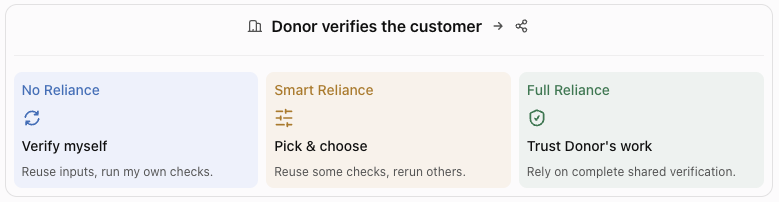
AiPrise supports three trust levels:
- No Reliance: Use the Donor's shared inputs and documents, but perform your own verification.
- Smart Reliance: Reuse selected data and verification information while retaining control over which checks to perform independently.
- Full Reliance: Receive the complete verification information shared by the Donor and rely on the Donor's verification outcomes.
The key distinction: Trust levels define how much of the Donor's verification work the Recipient can use and rely on—from using only shared inputs, to selectively reusing information and checks, to relying on the complete shared verification outcome.
The three trust levels
One verification. Three ways to use it.
1. No Reliance
Verify myself. Use shared input information only.
With No Reliance, the Donor shares the permitted customer inputs and documents with the Recipient. The Recipient uses this information as the starting point for its own verification process.
The Recipient remains responsible for running its checks using its own templates, configuration and policies, and making its own verification decision.
How it works
- The Donor shares the customer's permitted inputs and documents.
- The Recipient receives the shared information.
- The Recipient runs its own verification checks using its configured templates.
- The Recipient makes its own verification decision.
What this means for the Recipient
- Receives shared customer inputs and documents.
- Does not rely on the Donor's verification outcome.
- Retains control over its verification checks and policies.
- Makes an independent verification decision.
2. Smart Reliance
Pick & choose : Reuse what is relevant. Perform additional checks when needed.
Smart Reliance gives the Recipient flexibility to use selected data and verification information shared by the Donor while retaining control over its own verification requirements.
Instead of treating the Donor's verification work as an all-or-nothing choice, the Recipient can decide which information or checks to reuse, which checks to rerun, and which additional checks or configurations to perform independently.
How it works
- The Donor shares the information permitted under the partnership agreement.
- The Recipient receives the shared data and verification information.
- The Recipient determines what it can reuse and what needs to be checked again.
- The Recipient can rerun selected checks or configure additional checks using its own requirements.
- The Recipient makes its decision based on the verification process it has chosen.
What this means for the Recipient
- Can reuse selected information and verification work from the Donor.
- Can choose which checks to rerun.
- Can perform additional checks independently.
- Retains flexibility over its verification configuration and decision.
3. Full Reliance
Trust Donor's work: Rely on the Donor's complete shared verification information.
With Full Reliance, the Recipient receives the complete verification information shared by the Donor and relies on the Donor's verification outcomes.
This allows the Recipient to make use of the Donor's verification work rather than independently repeating the full set of checks.
How it works
- The Donor completes its verification process.
- The Donor shares the complete verification information covered by the partnership agreement.
- The Recipient receives the shared verification information.
- The Recipient relies on the Donor's verification outcomes.
What this means for the Recipient
- Receives the complete verification information shared by the Donor.
- Can rely on the Donor's verification outcomes.
- Can make use of the Donor's completed verification work.
Trust levels at a glance
| What it means | No Reliance | Smart Reliance | Full Reliance |
|---|---|---|---|
| Inputs & documents | Shared | Shared | Shared |
| Verification information | Not relied upon | Selected information reused | Complete shared information |
| Run checks independently | Yes | Selectively | Relies on Donor's outcomes |
| Rerun selected checks | Yes | Yes | No independent rerun implied |
| Configure own checks | Yes | Yes, for additional checks | Not the primary approach |
| Verification decision | Recipient's own | Based on reused information and its own checks | Relies on Donor's verification outcomes |
Which trust level should you choose?
The right trust level depends on how your organisation wants to use verification information received from its partners.
- Choose No Reliance when you want access to previously collected customer information and documents but prefer to perform verification independently.
- Choose Smart Reliance when you want to reuse relevant parts of a partner's verification work while retaining flexibility to perform additional or repeated checks.
- Choose Full Reliance when you are comfortable relying on the complete verification information shared by your partner.
Things to consider
Before agreeing on a trust level with a partner, consider:
- Verification requirements: How much of the partner's verification work can your organisation use?
- Independent checks: Do you need to rerun specific checks or apply your own verification configuration?
- Decision ownership: Do you want to make an independent decision, combine reused information with your own checks, or rely on the Donor's verification outcomes?
- Partnership agreement: Ensure the selected trust level and permitted information sharing are aligned between both parties.
Remember: Trust levels determine how much of the Donor's verification work the Recipient can use and rely on. They provide flexibility between independently verifying every customer, selectively reusing a partner's work, and relying on the complete verification information shared by that partner.
Updated about 20 hours ago