
User - Proof of Address (POA)
Address Document Module | SDK & API
Overview
The Address Document Module enables structured and reliable Proof of Address (POA) verification as part of KYC.
It replaces the legacy User Document Module – POA and provides stronger validation, configurable document rules, and support for multiple file types.
This module is recommended for all new integrations.
Module Availability & Defaults
- New customers: the Address Document Module is enabled by default.
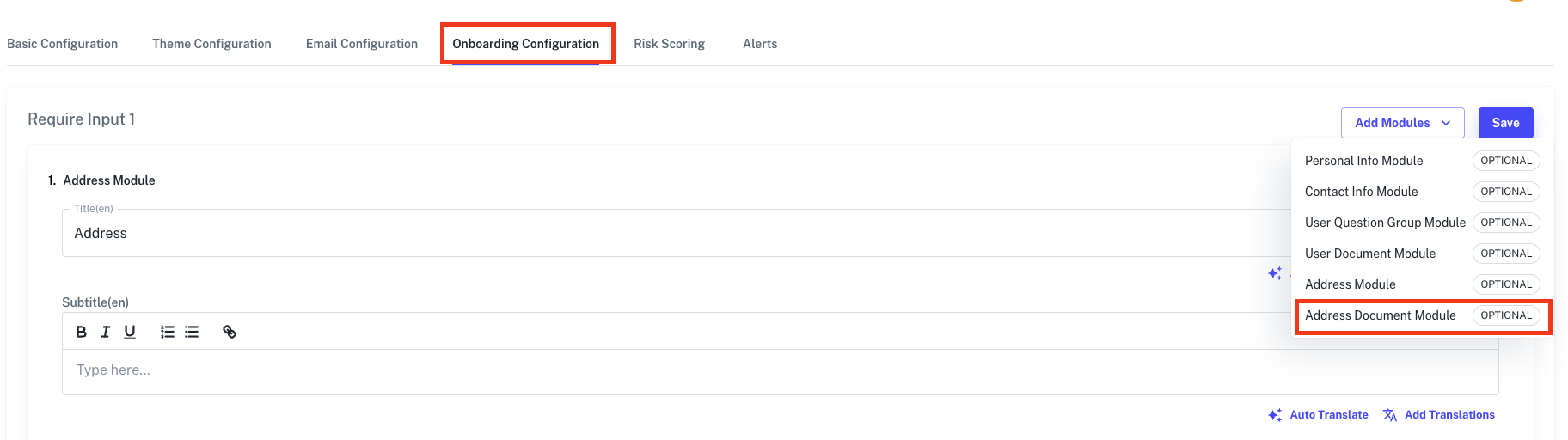
- Existing customers: it is enabled on templates configured for address verification. Check the onboarding modules on your template to confirm which module it uses.
Supported Documents
AiPrise classifies each submitted POA document into one of the following categories:
| Category | Description |
|---|---|
FINANCIAL_STATEMENT | Bank statement, credit card statement, investment or brokerage statement |
UTILITY_BILL | Electricity, gas, water, internet, phone, or other utility bill |
GOVERNMENT_LETTER | Letter from a government authority, tax notice, benefit or council letter |
INSURANCE_DOCUMENT | Insurance policy schedule, renewal notice, or coverage certificate |
TENANCY_AGREEMENT | Rental or lease contract between landlord and tenant |
EMPLOYMENT_DOCUMENT | Payslip, employer letter, or any employment-related document |
NATIONAL_ID | National identity card, passport, driving licence, or government-issued ID |
UNKNOWN | Cannot be determined or does not fit any other category |
poa_document_category is the classifier's own assessment of the uploaded document. It is returned on the response and is not configurable.
What you configure on a template is which document types a user may submit, set on the Address Document Module within Templates. Those are a separate set of values, sent as file_sub_type on the request. See Document sub-types below.
File Upload Rules
| Rule | Value |
|---|---|
| Maximum documents per check | Up to 2 |
| File formats | PDF and/or Images |
| Image formats | JPG, JPEG, PNG |
| File size limit | 10 MB per file |
SDK Behaviour (Onboarding Flow)
When using the onboarding SDK:
- Users must select a document type before upload
- Upload rules are dynamically applied based on the selected document
- On-device quality checks detect:
- Blurry or unreadable documents
- Unsupported file formats
- If the uploaded document does not match the selected document type, an error is shown
- Users see clear guidance on allowed file types and remaining upload count
Note: On-device checks and document-type mismatch validation apply only to SDK-based integrations, not API-only flows.
Response
When a POA document is processed, the response includes a poa_document_category field indicating the classified document type.
{
  "poa_document_category": "UTILITY_BILL"
}
The value is one of the categories listed in Supported Documents.
API Integration
Endpoint
POST /api/v1/verify/run_user_verification
Address Document Payload
When submitting POA via API, send additional_info_data as an array, one entry per document, and include file_sub_type to declare the document type.
{
  "additional_info": [
    {
      "additional_info_type": "ADDRESS_PROOF_DOCUMENT",
      "additional_info_data": [
        {
          "file": "base64_payload_string",
          "file_sub_type": "NATIONAL_ID_FRONT"
        }
      ]
    }
  ]
}
Only the payload portion of the base64 string should be sent.
Only file and file_sub_type are read from each entry. You may also send additional_info_data as a plain base64 string instead of an array, but then no sub-type is declared and the checks below do not apply.
Business verification uses a different shape for the same document type. There,
additional_info_datais an object with a requiredfile_datakey, andfile_sub_typeis not read. The shape above applies torun_user_verification.
Document sub-types
file_sub_type is the document type you declare on the request. It comes from the Address Document Module's accepted types on your template:
file_sub_type | Typical document |
|---|---|
NATIONAL_ID_FRONT | Front of a national ID card |
NATIONAL_ID_BACK | Back of a national ID card |
UTILITY_SERVICE_BILLS | Electricity, gas, water, internet or phone bill |
FINANCIAL_STATEMENTS | Bank, credit card or brokerage statement |
GOVERNMENT_CORRESPONDENCE | Letter from a government authority |
RESIDENTIAL_DOCUMENT | Other proof of residence |
EMPLOYMENT_EDUCATION_DOCUMENT | Payslip, employer or institution letter |
LEGAL_DOCUMENT | Tenancy agreement or similar |
ADDRESS_DOCUMENT_OTHERS | Anything else |
How it differs from poa_document_category
poa_document_categoryThey are two different sets and they travel in opposite directions:
file_sub_typeis input. You declare what you believe the document is.poa_document_categoryis output. The classifier reports what it found.
The two are compared. If you declare a specific sub-type and the classifier disagrees, a DOCUMENT_TYPE_MISMATCH warning is raised. For example, declaring FINANCIAL_STATEMENTS for a document the classifier reads as a payslip (EMPLOYMENT_DOCUMENT) triggers it.
Four values accept any category and so never trigger that check: RESIDENTIAL_DOCUMENT, EMPLOYMENT_EDUCATION_DOCUMENT, LEGAL_DOCUMENT and ADDRESS_DOCUMENT_OTHERS. Omitting file_sub_type, or sending the document as a plain base64 string, also disables it.
Validation & Enforcement
Validation rules are enforced at both:
- SDK level (on-device checks)
- Backend level (API validation)
This includes:
- File type and size limits
- Document count limits
- Customer-configured document rules
- Module exclusivity checks
Migrating from the legacy User Document Module
The Address Document Module replaces the legacy User Document Module for proof of address. It adds document classification, configurable per-type rules, and support for multiple file types, and it is the module new integrations should use.
On the request
Send additional_info_data as an array and declare file_sub_type on each entry, as shown in Address Document Payload. The plain base64 string form is still accepted, but it declares no sub-type, so the document-type mismatch check does not run.
On the response
Proof-of-address results are returned in the additional_info array, and the shape you receive is signalled by additional_info_response_type rather than by the module you are on. Branch on that field.
The same upload can come back as either ADDRESS_VERIFICATION or DOCUMENT_INSIGHTS, depending on the provider that runs the check for your country and template. Both shapes are set out field by field in Document Insights. If your integration handles only one of them, the other will look like an empty or unrecognised result.
Checking which module a template uses
Open the template and review its onboarding modules. The Address Document Module appears there by name; a template still on the legacy module will not show it.
Updated about 2 months ago